Connect Here

Jcyberinux - Facebook Page Follow Jcyberinux on Twitter RJMANILATECH RSS Youtube - Jcyberinux
Showing posts with label Apacer AH190. Show all posts

Saturday, June 24, 2017

Apacer AH190 - the wonder little shiny thing for Apple lovers

When we purchase for the new iPhone or iPad, 128GB or 256GB will be an issue as the price is different up to hundred dollars. So normally we will choose the average, means 64GB or 128GB iPhone or iPad. After few months, we can terribly realize that our phone or iPad memory why so small. iPhone 7 and 7 Plus can make the 4K video, that mean the video clips will take a lot of memory space. And we all do not want to delete any. All those good memories of our life, our family, the cutie furry cats or funny dogs. We want to keep it all. Then come we need to find another solution which can help to share iPhone’s duty on keeping pictures and videos.
Apacer
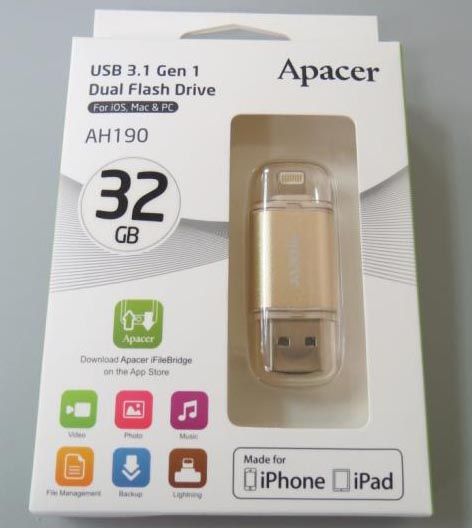
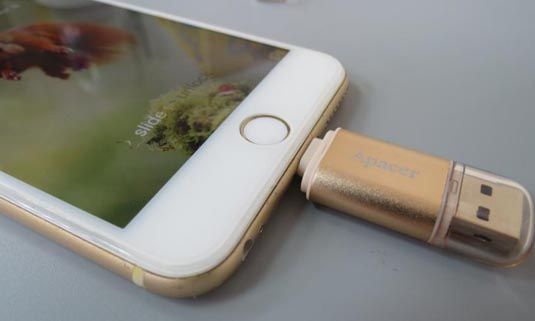
The sleek AH190 is a memory booster for iPhone and iPad, equipped with Apple MFi certified Lightning and USB 3.1 Gen 1 Type-A dual-interface. Apacer AH190 comes in capacities of 16GB, 32GB, 64GB, and 128GB.
Apacer
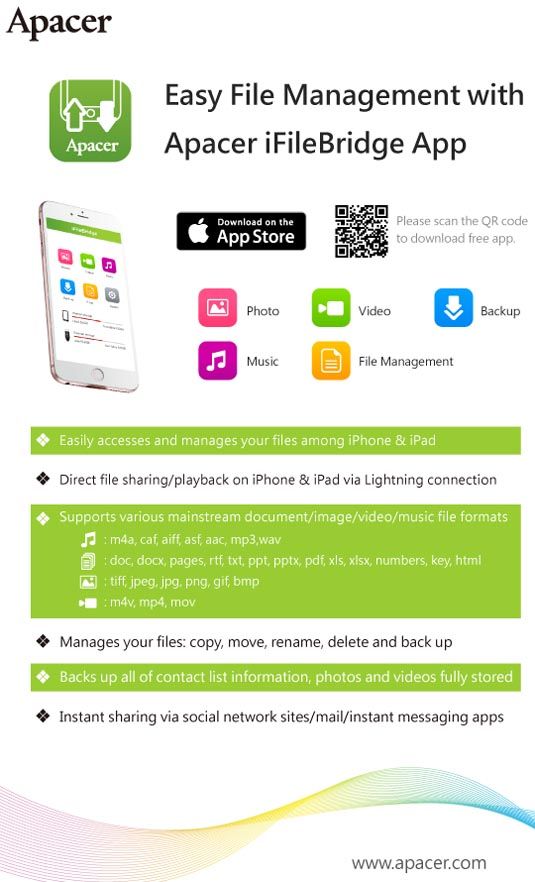
The Lightening connector is super easy to use. You can just plug and play. An Apple app automatically comes up on your iPhone or iPad, the first time the Lightning connector is plugged into your Apple device, asking to install an Apacer iFileBridge app.
Apacer Apacer
AH190 has a small size. Just in your cosmetic bag or in your pant pocket, we can easily take it out and plug into the iPhone or iPad whenever we filming or shooting picture or after those tasks, we will transfer all the things to AH190 through the iFileBridge.
Apacer Apacer
According to Apacer’s website, the multimedia format that can be recognized by iFileBridge includes: m4a, caf, aiff, asf, aac, mp3,wav, m4v, mp4, mov. So another great point of this small but powerful memory booster AH190 is you can copy any movie you love and watch it on your Apple devices without hassle.
Apacer
Why we still hesitate to pick one AH190 for us? All stresses from memory drain will go away. Only happiness stay together with the memory extend device called AH190.

*Disclosure: An important note, we are just sharing this information to the public, provided by our source. Apacer - Info / Logos / Photos / Images has respective copyrights.
Read more >>>

Saturday, October 1, 2016

Apacer AH190 USB3.1 Gen 1 Dual Flash Drive for iPhone and iPad

Apacer recently introduces a flash drive AH190 compatible with iOS, Mac and PC to simplify the workflow of transferring files between iOS devices and PCs. You can use it to store photos and videos from your iPhone & iPad without the need of iTunes, and transfer photos and videos from AH190 by using Apacer iFilebridge App.
Apacer AH190 Dual Flash Drive
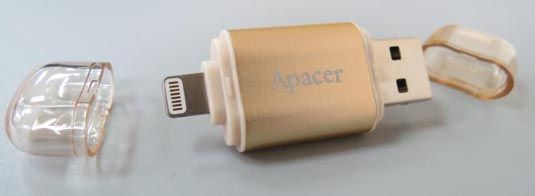
The AH190 provides a luxurious design with meticulous quality plus the convenience of combined Lightning and USB 3.1 Gen 1 connectivity. It has snap on clear plastic caps on each end of the device, for protection of the Lightning connector and the USB connector. It is lightweight and thin, and can easily be carried in your pocket.
Apacer AH190 Dual Flash Drive 
 Apacer AH190 Dual Flash Drive
The Lightening connector is super easy to use. You can just plug and play. An Apple app automatically comes up on your iPhone or iPad, the first time the Lightning connector is plugged into your Apple device, asking to install an Apacer iFileBridge app.

When the iFileBridge app is installed, the green icon of it will appear on the screen. This iFileBridge app is used to control transfers of all files to and from your Apple device and the Apacer AH190 drive. Operation is simple through the app. To transfer files to and from your PC and the Flash drive, no additional software is needed.
Apacer AH190 Dual Flash DriveApacer AH190 Dual Flash Drive
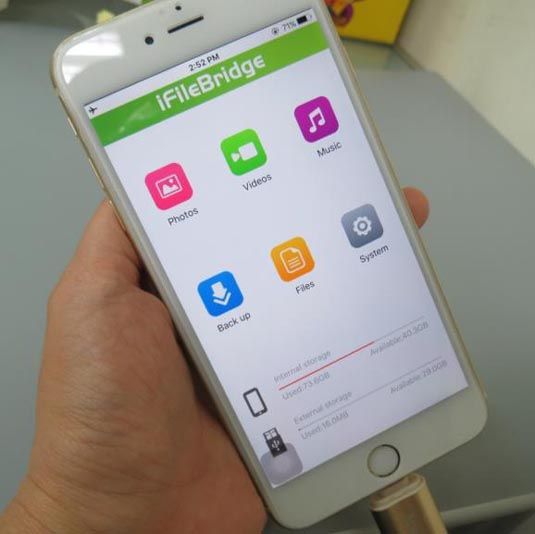
The app’s interface has six sections: Photos, Videos, Music, Back up, Files, and System. The used and available storage space of internal storage and external storage displays in the bottom on the home screen. The interface is clean and easy to understand. You can view and playback files on the app itself seamlessly.

With iFileBridge, you can manage all types of files, including photos, videos, and documents. To copy a file, you just tap Files on the home screen, Tap Copy to copy an item, and then move and paste it to the destination. The app makes it really easy for you to copy/transfer files back and forth between your phone or iPad and flash drive. Here I show you how easy you can copy your pictures on iPhone and move to AH190 flash drive.

1) Click on the [Files] icon for file transfer between your phone and the flash drive.
2) To access the storage on your phone, click the [iPhone] to proceed
3) You can see all pictures of your phone 
4) You can select some or select all, then copy and move those files (and can see the other function such as Cut, paste, Rename or Delete)
5) Choose [iFileBridge] and you can access your storage on AH190 flash drive. 
6) You can create a new folder and then paste those selected files. The files transfer is easily done by just a few clicks.

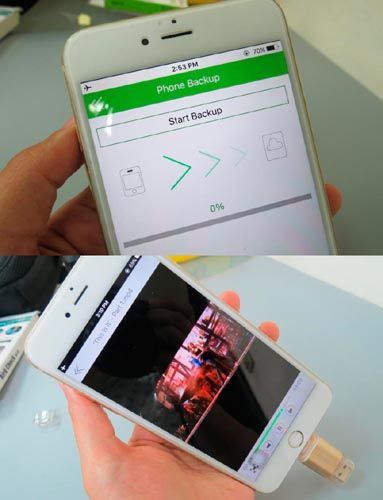
For backup, you can choose to back up the whole photos and videos on the device, or back up the contact list. It makes it so much faster to be able to transfer those photos, or movies to your computer as a backup if you aren't backing up to the cloud.
Apacer AH190 Dual Flash Drive
I copied a .mp4 in the drive to see if it could be played directly on the iPhone without any additional software, and the video played great, no lag or anything. It didn't take any second to buffer, it just played directly. With this flash drive, you can quickly copy a file to the flash drive from your desktop or laptop and then you can quickly play it on your iPhone. According to Apacer’s website, the multimedia format that can be recognized by iFileBridge includes: m4a, caf, aiff, asf, aac, mp3, wav, m4v, mp4, mov.

Apacer AH190 is a great flash drive for anyone that needs a storage extension for iOS devices. This flash drive can extend your storage by 32 GB, which is a lot of storage space. The device will ask you to install a free app, and after you do, you can transfer data between your phone and the flash drive.

I really like how fast this flash drive transfers data, as it doesn't make me wait long for my files to transmit. This is great for transferring files quickly between the iPhone and computer without having to go through iTunes. Overall, this is a great flash drive bring advanced usability and style together, and I would recommend it to you.

*Disclosure: An important note, we are just sharing this information to the public, provided by our source. Apacer - Info / Logos / Photos / Images has respective copyrights.

Read more >>>

Saturday, July 2, 2016

Apacer AH190 Dual Flash Drive for iOS Devices

Calling all Apple users, who must constantly rely on iTunes, computers, and transmission cables for content sharing! Apacer AH190, the newly introduced dual flash drive, is the latest solution that bypasses conventional methods, making transfers of videos and photos simpler than ever!  The small, compact design of this Apple MFi certified USB 3.1 Gen 1 & Lightning dual flash drive is superbly built with excellent portability, quality, and safety that is far ahead of other products of the same grade.
Apacer AH190 Dual Flash Drive
Apple-friendly: A Booster for iPhones and iPads
For those who are often restrained by the memory capacity of Apple products and end up compromising on producing videos and photos of precious moments, or enjoying high definition contents, Apacer AH190 can ease the concerns by expanding the memory of on iPhone and iPad. Available in 16GB, 32GB, and 64GB, the design of AH190 is a cost-effective solution that boosts memory on Apple products. The thoughtfully designed Lightning connector bears extra length to ensure each insertion devices is successful, without ever having to remove the cover or shell.   

Sharing Made Easier Than Ever with Lightning USB 3.1 Gen 1 Dual Interface
AH190 is equipped with Lightning and USB 3.1 Gen 1 Type-A dual-interface. It works unboundedly between iOS devices, MAC computers, PCs, and other compatible devices. Without iTunes, computers, or transmissions via wireless or cable, sharing of large files and full HD videos with others is as instantaneous as 5Gbps.
Apacer AH190 Dual Flash Drive
Easy File Management with Apacer iFileBridge App
To quickly manage the files in the Apple mobile device and in AH190, Apacer has introduced an iFileBridge, an exclusive app that offers a simple, user-friendly interface to make video plays, data backup, and file sharing as easy as a few finger movements.  The touch-and-backup feature allows the user to duplicate data from device to AH190, keeping all of contact list information, photos, and videos fully stored.  Back up as you gain more files: as your device becomes more crammed with more picture or content, simply tap and keep your back up files most up to date. 
Apacer AH190 Dual Flash Drive
Intuitive, Practical, and Aesthetic
Apacer AH190 is designed to bear the same philosophy that gives Apple products a minimalistic look. Chicly available in 2 color tones, Gold and Rose Gold, AH190’s sleek contour is built with aluminum alloy.  The surface is designed with an inward curve in the middle, which forms a different visual reflection and facilitates easy finger grasp during insertion or extraction. 

The covers of Lightning and USB ports are made see-through to keep its users informed which end they are accessing. The aesthetic-meet-practicality concept ensures a pleasant experience each time of use!

For more information about the product(s), please visit the Apacer website (click here).

*Disclosure: An important note, we are just sharing this information to the public, provided by our source. Apacer - Info / Logos / Photos / Images has respective copyrights.
Read more >>>

Popular Posts

Blog Category

Blog Archive


Infolinks
Copyright © 2013 RJ Manila Tech. Powered by Blogger.